

Most PMOs don't have a privacy problem. They have a where-does-this-data-live-and-who-owns-it problem that only looks like a privacy problem once an auditor, a regulator, or a nervous legal team starts asking questions.
The pattern shows up the same way almost everywhere. A portfolio tool fills up with project data over three or four years—status notes, resource names, vendor contacts, financials, the occasional performance comment buried in a risk log—and nobody ever decided, on purpose, what should be in there, who's responsible for keeping it clean, or when any of it should be deleted. Then a data subject access request lands, or a vendor contract gets scrutinized, and suddenly the PMO is explaining why a contractor's personal email from 2021 is still sitting in a dependency note.
This article is about building a minimal control set—classification, steward roles, retention recipes, vendor clauses, and sample admin policies—that lives inside your tooling and workflows instead of in a binder. The goal isn't compliance theater. It's making your portfolio data defensible without slowing down the people doing the work.
Why PMO tooling privacy controls break down in the first place
The core issue is that PMO tooling was never designed around data ownership. It was designed around visibility. The whole value proposition of a portfolio platform is that everyone can see everything, roll it up, and report on it. Privacy controls are the opposite instinct—limit, classify, expire, restrict—so they get bolted on late and badly.
A few structural reasons this keeps happening:
-
Nobody owns the field. A project manager enters a vendor contact's phone number into a risk item. Is that the PM's data? The vendor's? The PMO's? In practice, it's orphaned the second it's typed.
-
Tools make it trivial to copy. Status gets pasted into decks, exported to spreadsheets, synced to a BI layer, and emailed to a steering committee. Personal data multiplies across systems that have no retention logic at all.
-
Classification is treated as a one-time tagging exercise instead of something baked into intake and the workflow itself.
-
Retention is nobody's job. Deleting old project data feels risky ("what if we need it?") and delivers no visible reward, so it never happens.
The privacy exposure usually isn't in the obvious places—it's in the free-text fields. Objectives and financials get locked down. The commentary fields, meeting notes, lessons-learned logs, and escalation threads are where names, opinions, salaries, health-related absence notes, and third-party contact details quietly accumulate.
What actually breaks as you scale
At 15 projects, informal works. One PMO lead can roughly remember what's sensitive and clean it up on request. At 150 projects across several business units, that memory is gone.
Stop losing track of critical projects.
GoProjy helps you monitor, prioritize, and deliver projects on time—seamlessly.
- Unified portfolio visibility
- Real-time resource tracking
- Milestone & risk alerts
No credit card required
Here's the operational cascade that tends to show up:
Access sprawl. Early on, you grant broad access because collaboration matters more than restriction. Three years later you've got ex-contractors, moved-on employees, and whole departments with standing read access to financials and personal data they no longer need. Nobody runs an access review because there's no trigger for one.
Export leakage. The canonical record stays reasonably controlled, but twelve exported copies don't. This is the single most common thing that turns a contained dataset into an uncontained one. Your retention rules mean nothing if the data walked out into email and OneDrive.
Integration blind spots. Once your portfolio tool is connected to a BI platform, a resourcing system, and a finance tool, personal data flows through pipes nobody mapped for privacy. If you've already thought through how your data flows—and if you haven't, the mechanics in portfolio data integration patterns that make KPIs reliable are worth reading—you'll know these connectors move far more than headline KPIs. They carry field-level detail too.
Retention paralysis. Without a recipe, the default is "keep everything forever," which is both a storage cost and a liability. Every record you hold is a record you may have to produce, search, or defend.
Controls that depend on a person remembering to do something will fail at scale. The only ones that survive are embedded in the workflow where the data is created.
The minimal control set
You don't need a governance program the size of your actual portfolio. You need five components that fit together.
1. A classification scheme with four tiers, not twelve
| Tier | What it covers | Example in a PMO tool | Default handling |
|---|---|---|---|
| Public | Non-sensitive, shareable | Project names, high-level status | No restriction |
| Internal | Operational, not for outside eyes | Timelines, milestone notes, risk logs | Restricted to org |
| Confidential | Financials, vendor terms, commercial | Budgets, contract values, SOW detail | Role-restricted |
| Restricted (personal) | Any personal or identifiable data | Resource names tied to performance, contractor contact details, absence reasons | Role-restricted + retention clock |
The key move is tying classification to the field or artifact type, not asking users to classify every item manually. A financials field is always Confidential. A resource-assignment note that includes a person's name is always Restricted. Build the default into the template so the right behavior is automatic and the human only intervenes at the edges.
One pattern worth stealing: treat free-text fields as Restricted by default until proven otherwise.
2. Steward roles that map to real people, with real triggers
-
Portfolio Data Owner — usually the PMO lead. Accountable for the classification scheme, retention recipes, and the overall "is our data defensible" question. Reviews access quarterly.
-
Project Data Stewards — the individual PMs. Responsible for their own project's data being classified correctly and cleaned at closure. This is where the work actually gets done.
-
Integration Steward — whoever owns the connectors and exports. Accountable for knowing what personal data moves between systems and whether downstream systems inherit the retention rules.
The roles only work if they're attached to workflow triggers:
-
At project intake, the steward confirms classification defaults are correct for anything unusual.
-
At each gate, a quick check
any new Restricted data added that needs handling?
-
At closure, the steward runs the retention recipe (below) and signs off that personal data has been handled.
-
Quarterly, the Portfolio Data Owner runs an access review and an export audit.
A simple flow shows how steward checkpoints map to project lifecycle gates.
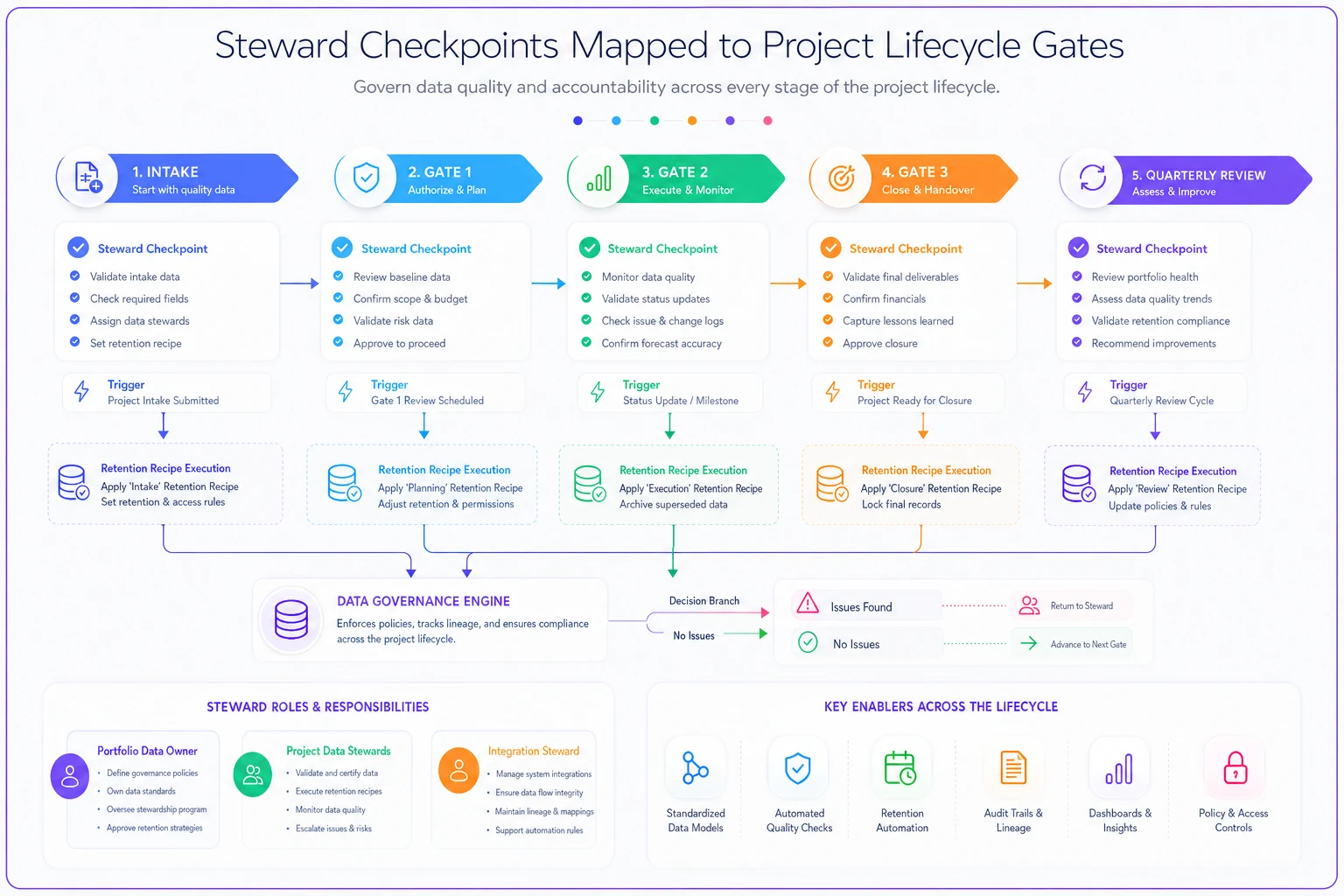
If you've built your lifecycle around evidence and SLAs already—the systems-first operational portfolio lifecycle with evidence and SLAs approach—these steward checkpoints slot directly into gates you already run. You're not adding a parallel process; you're adding two or three questions to checkpoints that exist.
3. Retention recipes, not a retention policy
A policy says "we retain project records for seven years." A recipe says exactly what happens, to which data, at which trigger, in which system. Recipes are what you embed.
-
Recipe A — Closure cleanup. Trigger
project moves to Closed. Scope: all Restricted free-text fields and resource contact details. Action: anonymize names in lessons-learned and risk notes; delete third-party contact details. Exception: financial records required for audit stay, but with personal identifiers stripped.
-
Recipe B — Vendor data expiry. Trigger
vendor contract end date + 90 days. Scope: vendor contact records, access credentials, SOW attachments with personal data. Action: revoke access, archive commercial terms, delete contact PII. Exception: active dispute or warranty period extends the clock.
-
Recipe C — Archive aging. Trigger
24 months after closure. Scope: archived project records. Action: move to cold storage with Confidential/Restricted fields purged, keeping only the audit-relevant skeleton. Exception: legal hold freezes everything.
The reason recipes beat policies: a policy requires interpretation every time, and interpretation under time pressure defaults to "do nothing." A recipe is a checklist tied to a trigger that already fires in your tool.
4. Vendor clauses you can actually enforce
-
Data minimization clause — the vendor provides only the contact and personnel data strictly needed, and notifies you when it changes.
-
Deletion-on-exit clause — both parties delete the other's personal data within a defined window after contract end (this is what powers Recipe B).
-
Subprocessor transparency clause — the vendor discloses where they send your project data, because your retention rules are worthless if their systems hold copies.
-
Breach notification clause — defined timeline for the vendor to notify the PMO, so you're not finding out from someone else.
The practical trick is linking the vendor record in your tool to the relevant clause status—so when the Integration Steward looks at a vendor, they can see whether deletion-on-exit applies and when the clock starts. Clauses buried in a signed PDF nobody reopens don't protect anyone.
5. Sample admin policies that live in the tool
The admin layer is where controls either hold or evaporate. Keep these short and configure them directly:
-
Access by role, reviewed quarterly. Default new users to the minimum tier. Expire contractor access automatically at a set date.
-
Export controls. Either restrict bulk export of Restricted fields or log every export with who/when/what, so the quarterly audit has something to look at.
-
Field-level masking. Restricted fields visible only to assigned roles; masked in rolled-up and shared views.
-
Audit logging on sensitive fields so you can answer "who saw this and when" without turning it into a forensic project.
The admin layer is where controls either hold or evaporate. Keep these short and configure them directly:
A real scenario
A mid-sized engineering services firm running a PMO across roughly 90 active and recently-closed projects got hit with a data subject access request from a former contractor. The contractor wanted to know everything held about them.
The problem: their name and contact details were scattered across risk logs, dependency notes, meeting minutes attached to tasks, and two exported status spreadsheets that had been emailed to a steering group. The PMO had no classification on free-text fields and no closure cleanup process. Finding every instance took one person most of two weeks, and they still weren't confident they'd found it all.
After that, they put in the minimal set. Free-text fields defaulted to Restricted, each PM became steward for their own projects, and a closure cleanup recipe anonymized personal references at project close. They added export logging and a quarterly access review that pruned around 30 stale accounts in the first pass.
The next similar request took under a day to fulfill, with an audit log backing the response. The storage footprint of archived projects dropped noticeably once aging recipes started purging Restricted fields. No new platform, no big program—just controls embedded where the data was created and triggers that fired on their own.
When this makes sense—and when it doesn't
When the minimal set is right: You're past about 30–40 projects, you hold any personal or vendor data in free-text, and you've connected your portfolio tool to other systems. At that scale, informal memory has already failed; you just might not have been audited yet.
When it's overkill: A very small PMO running under a dozen projects, all internal, with no vendor personnel data and no integrations, can probably get by with sensible access defaults and a closure habit. Don't build steward roles for data you don't really hold.
Who should not do this as a standalone project: Anyone tempted to spin up a six-month governance initiative with a steering committee and a taxonomy workshop. The whole point is that these controls embed into workflows you already run. If it becomes its own program, it'll produce a document and change nothing operationally—which is exactly the failure this is meant to avoid.
The thread that ties it together
The reason PMO privacy controls fail isn't that teams don't care. It's that the controls get designed as a separate layer—policies, binders, annual reviews—disconnected from the gates, intakes, and closures where data actually moves. Anything that depends on someone remembering to act will quietly rot.
Put classification in the template. Attach steward accountability to gates that already fire. Turn retention policies into recipes with explicit triggers. Link vendor clauses to the vendor records in your tool. Configure the admin layer so the defaults are safe. Do that, and PMO tooling privacy controls stop being a thing you scramble to produce under an auditor's deadline—and become a quiet property of how your portfolio already runs.
The reason PMO privacy controls fail isn't that teams don't care. It's that the controls get designed as a separate layer—policies, binders, annual reviews—disconnected from the gates, intakes, and closures where data actually moves. Anything that depends on someone remembering to act will quietly rot.
Put classification in the template. Attach steward accountability to gates that already fire. Turn retention policies into recipes with explicit triggers. Link vendor clauses to the vendor records in your tool. Configure the admin layer so the defaults are safe. Do that, and PMO tooling privacy controls stop being a thing you scramble to produce under an auditor's deadline—and become a quiet property of how your portfolio already runs.
Ready to elevate your project delivery?
Join over 2,500 project teams using GoProjy to optimize resources, reduce risks, and drive portfolio success.