


Most PMOs don't have an intake problem. They have an intake speed problem.
The quarterly prioritization process works fine for the big stuff — funded initiatives, roadmap slots, things that need executive sign-off. But that's maybe 20% of what actually hits your queue. The other 80% is the steady drip of tactical requests: "Can someone look at this vendor integration?" "Marketing needs a landing page fix by Thursday." "Finance wants a report changed before month-end close."
These don't fit the quarterly cadence. They can't wait six weeks for a scoring committee. And when a PMO forces them through heavyweight governance, one of two things happens: the request rots in a backlog nobody triages, or someone just does it off-book, outside any tracking, and now you've got shadow work eating capacity you didn't plan for.
The fix isn't a bigger intake process. It's a smaller, faster one that runs alongside your normal governance — something that can make a keep/kill/escalate decision inside 72 hours. That's what this piece walks through: a fast-score card, SLA rules that actually get honored, escalation paths, and a flow to convert the backlog you already have into scored, routed work.
Why fast requests break normal intake
The core mismatch is timing. Portfolio governance is built for decisions that are expensive to reverse. Tactical requests are cheap to reverse and expensive to delay. Running them through the same gate is like sending every email to legal review.
In practice, the breakdown usually looks like this. A request comes in through Slack, email, a hallway conversation, or a ticket. It gets a verbal "yeah we'll look at it." There's no owner, no clock, no criteria for what "look at it" means. Two weeks later the requester follows up, annoyed. Someone scrambles, pulls a developer off planned work, and the tactical request quietly displaces something that was actually prioritized.
Teams that scale badly almost always share one trait: they never separated strategic intake from tactical intake. Everything went through one funnel. The strategic stuff moved too fast — skipping real evaluation — and the tactical stuff moved too slow, drowning in evaluation it never needed. A good intake triage template for a PMO starts by admitting these are two different animals and giving each its own lane.
There's a capacity dimension here too. Every unscored tactical request is invisible demand. If you're trying to run a clean capacity and demand management system, untracked tactical work is quietly blowing your forecast apart. You can't manage load you never measured.
The fast-score card
The whole point is a decision in minutes, not a meeting. So the card has to be small enough that the person receiving the request can fill it out themselves without a workshop.
Stop losing track of critical projects.
GoProjy helps you monitor, prioritize, and deliver projects on time—seamlessly.
- Unified portfolio visibility
- Real-time resource tracking
- Milestone & risk alerts
No credit card required
| Dimension | 1 (low) | 2 (medium) | 3 (high) |
|---|---|---|---|
| Urgency | Can wait 30+ days | Needed within 2–4 weeks | Hard deadline inside 7 days |
| Impact | One team, cosmetic | Multiple teams or a revenue/compliance touch | Blocks revenue, a launch, or a regulatory date |
| Effort | Under a day | A few days | A week or more / needs specialists |
| Reversibility | Easy to undo | Some rework if wrong | Hard/expensive to reverse |
Total ranges from 4 to 12. The routing is deliberately blunt:
-
4–6 Backlog. Not urgent, low impact. It waits or gets batched.
-
7–9 Tactical fast lane. Assign an owner, give it an SLA, do it.
-
10–12 Escalate. High impact and high effort or low reversibility means this is really a strategic decision in disguise — it needs real funding and sequencing consideration, not a fast-lane fix.
That last rule matters more than it looks. The biggest mistake teams make with fast intake is letting big things sneak through the small door because someone slapped an "urgent" label on them. A request scoring 11 with high effort and low reversibility is not a tactical request. It's a strategic decision wearing a hoodie. Escalating it protects you from committing three weeks of specialist time to something that never got weighed against your funded roadmap.
One field the card also needs, separate from scoring: requester and sponsor. If nobody with budget authority will put their name next to it, that already tells you something.
SLA rules that people actually honor
An SLA that isn't enforced is decoration. The trick is keeping timelines short enough to stay credible and specific enough that "we're working on it" doesn't count as compliance.
Tie the SLA to the decision, not the delivery. The 72-hour clock is about giving the requester an answer — accepted, backlogged, escalated, or declined — not about finishing the work.
-
Acknowledgement — 4 business hours. Someone confirms receipt and that it's in triage. No decision yet. This single step kills most "did anyone even see my request?" follow-ups.
-
Scoring — 24 hours. The card gets filled out. If information is missing, the clock pauses and the requester is told exactly what's needed.
-
Routing decision — 72 hours. Backlog, fast lane, or escalate. Whatever happens, the requester knows the outcome within three business days.
-
Fast-lane start — 5 business days from acceptance. For 7–9 scores, work begins within a week or the SLA is breached and flagged.
The enforcement piece people skip: you need a breach owner. When an SLA is missed, one named person gets pinged — usually the PMO lead. Not to punish anyone, but because a breach is data. If you're regularly missing the 72-hour decision SLA, either your triage capacity is too thin or your fast lane is overloaded. Both are real signals worth surfacing.
One pattern worth watching: teams that set SLAs and never breach them are usually padding the timelines. If nothing is ever late, slow work is hiding inside "on time." A healthy fast lane breaches occasionally — that's how you know the limits are tight enough to mean something.
Escalation paths
Escalation from tactical intake is different from incident escalation. You're not paging someone at 2am. You're moving a request from the fast lane into a slower, higher-authority decision because it's too big to absorb tactically.
Three escalation triggers worth hard-coding:
-
Score of 10–12 — automatic escalation, per the card.
-
No sponsor with budget — a request that needs real effort but has no one accountable for the outcome. This goes up, not through.
-
Cross-portfolio impact — if honoring the request delays or reshuffles funded work, that trade-off belongs to whoever owns the portfolio, not the person doing triage.
Where it escalates to depends on your operating model, but keep the path to two levels max. Triage owner → PMO lead → portfolio decision-maker. More hops than that and you've built a bureaucracy, not an escalation path. Teams that handle this cleanly tend to have already sorted out their decision rights and layering — the kind of structural clarity covered in the operating-model blueprint for scaling PMOs. Without that, every escalation turns into a fresh argument about who decides.
One thing teams consistently get wrong: they escalate the request but not the context. The portfolio decision-maker gets a one-line "can we do this?" with no score, no effort estimate, no note on what it would displace. Then they have to reconstruct all of it themselves. Always escalate the filled-out card, not just the ask.
Converting the backlog you already have
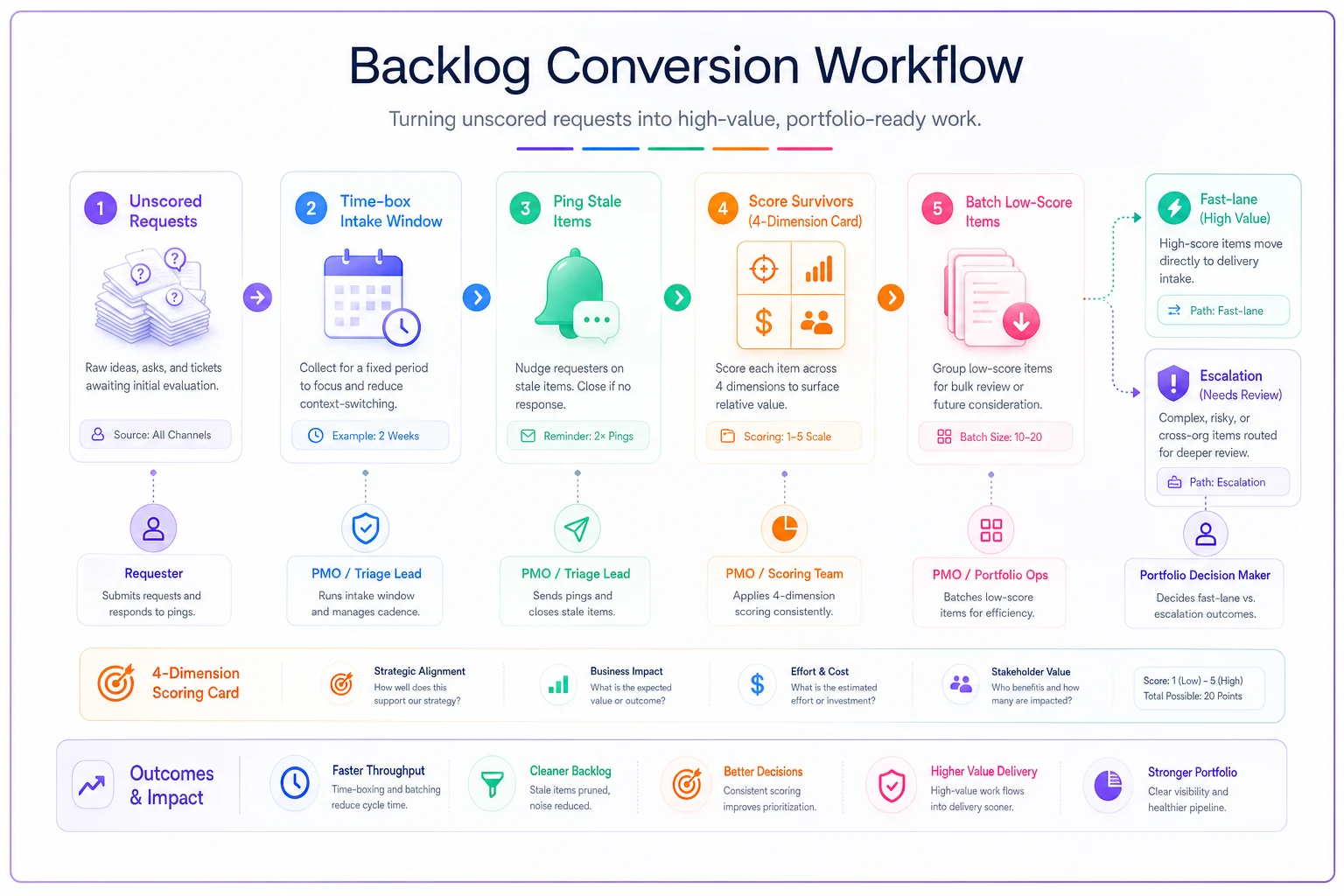
Most PMOs installing a fast-intake system already have a backlog — a graveyard of requests logged over months that nobody scored. Before the new flow can work, that pile has to get processed, or it'll sit there undermining the whole thing.
-
Time-box it. Give the backlog cleanup a fixed window — two afternoons, not "when we get to it." Backlog cleanup expands to fill whatever time you give it.
-
Kill the stale first. Any request older than 90 days with no follow-up gets a "still needed?" ping to the requester. No response in 48 hours = closed. You'll clear a surprising amount this way. A lot of backlog isn't real demand; it's stuff people wanted once and forgot about.
-
Score what's left with the card. Same four dimensions. Speed over precision — you're sorting, not deliberating.
-
Batch the 4–6s. Low-score survivors get grouped. Often five small backlog items can be knocked out in one focused block cheaper than handling them one at a time.
-
Route the rest into the fast lane or escalation as normal.
Here's a short visual guide to the conversion flow.
Quick backlog-conversion checklist
-
- [ ] Pull every open request into one list, no matter the source
-
- [ ] Flag anything older than 90 days for the "still needed?" ping
-
- [ ] Close non-responses after 48 hours
-
- [ ] Score survivors on the 4-dimension card
-
- [ ] Batch 4–6 scores into a single work block
-
- [ ] Route 7–9 to fast lane, 10–12 to escalation
-
- [ ] Record how many closed vs. converted — that ratio is your baseline
That last number is quietly useful. If 60% of your backlog closes out as "not actually needed," that's a strong argument for the whole fast-intake system: most of what was clogging the queue was never real work.
A real scenario
A mid-sized software company's internal PMO — supporting around 25 active projects across product, IT, and operations — was getting hammered by tactical requests. Roughly 40–50 a month, arriving through four different channels, none of them scored. The team estimated close to a third of their delivery capacity was going to unplanned tactical work that displaced roadmap commitments.
They ran the backlog conversion first. The open pile was around 90 requests. After the "still needed?" pass, a little over half closed out — nobody had followed up in months. Of the survivors, most scored in the 4–6 range and got batched. A handful escalated because they'd quietly ballooned into real initiatives while sitting unscored.
Once the fast-score card and 72-hour SLA went live, the shift wasn't dramatic on paper but it changed how the team operated day to day. Requesters stopped chasing because they got an acknowledgement within a few hours and a decision within three days. The PMO also started seeing which teams were generating the most tactical load — product marketing alone accounted for close to a third of it — which turned into a useful conversation about giving that team a small standing capacity allocation instead of firefighting each request individually.
The number that mattered most: unplanned tactical displacement of roadmap work dropped from roughly a third of capacity to closer to 15%. Not because they did less tactical work, but because it was now visible, scored, and either scheduled or consciously declined instead of silently jumping the queue.
When this makes sense — and when it doesn't
This flow is built for a specific situation. It's not universal.
It makes sense when:
-
You get more than a handful of tactical requests a week
-
Requests arrive through multiple uncontrolled channels
-
Your existing governance is too slow for sub-week decisions
-
You suspect shadow work is eating unmeasured capacity
It's a bad idea when:
-
Your entire portfolio is a few large strategic initiatives with almost no tactical flow — you'd be building a machine for traffic that doesn't exist
-
You don't yet have basic ownership clarity; a fast lane with no accountable owners just accelerates chaos
-
Leadership won't back the "decline" outcome — if every request has to be accepted regardless of score, triage is theater
Very small teams where one person already sees and decides everything probably don't need this either. If the whole intake fits in one head, formalizing it adds overhead without adding signal. The flow earns its keep once no single person can track all incoming requests anymore — which in practice is right around the point most PMOs start feeling the pain.
Where to keep it
The card, the SLA clocks, and the routing don't need special software to start. A shared spreadsheet with a scoring template and a few tracked columns will run the whole thing for a while, and starting there forces you to prove the flow works before investing in tooling.
Use a shared spreadsheet to run the card and SLA timestamps before moving into a workflow tool.
The point where a spreadsheet strains is SLA tracking. The 4-hour acknowledgement and 72-hour decision clocks are tedious to watch manually, and breaches slip through unnoticed. That's usually when a proper workflow tool with timers, automatic acknowledgements, and breach flags starts paying for itself. But that's an optimization, not a prerequisite. Get the decisions fast and consistent first; automate the clock-watching later.
The real win here isn't the card or the SLA. It's the decision to stop treating every request the same. Once tactical and strategic intake run in separate lanes, each moving at the speed it actually needs, the queue stops being a source of anxiety and starts being a source of information about where your demand is really coming from.
Ready to elevate your project delivery?
Join over 2,500 project teams using GoProjy to optimize resources, reduce risks, and drive portfolio success.