



Your portfolio runs on specialists. The data architect who understands legacy integration patterns. The regulatory compliance expert who knows FDA submission processes. The cloud migration specialist who actually understands your mainframe dependencies. These aren't just resources—they're bottlenecks waiting to happen.
Most PMOs discover specialist constraints the hard way. Three projects suddenly need the same security architect for critical path activities. Your only SAP BASIS administrator gets pulled into production issues while four implementation projects wait. The senior business analyst who knows procurement workflows across all divisions announces they're taking a two-week vacation right before parallel go-lives.
Standard resource management breaks down completely when dealing with named specialists. Generic capacity models assume fungibility—that one developer equals another developer. But when Project Alpha needs Sarah specifically because she wrote the original authentication module, and Project Beta needs Sarah because she's the only one who understands the legacy payment gateway, you're not managing capacity anymore. You're managing monopolies.
The specialist constraint pattern nobody talks about
Every PMO faces resource constraints, but specialist bottlenecks operate differently than general capacity issues. When you're short on developers, you can redistribute work, bring in contractors, or adjust timelines. When your only specialist who understands both GDPR compliance and your custom data architecture gets overallocated, those options disappear.
The real problem isn't scarcity—it's unpredictability combined with criticality. A Java developer being unavailable delays features. Your integration architect being unavailable stops entire workstreams across multiple projects. The blast radius is completely different.
Specialist bottlenecks compound once they start. Once a specialist becomes a bottleneck in one project, the delays cascade. Other projects start hoarding their time "just in case." Project managers begin padding estimates whenever that specialist is involved. The specialist themselves, feeling the pressure, starts batching similar work across projects, which creates synchronized delays everywhere.
Traditional portfolio bottleneck management systems assume you can see constraints coming through capacity planning. But specialist bottlenecks often emerge from unplanned work. A production issue requires your database specialist for three days. A regulatory change means your compliance expert needs to review every in-flight project. A technical discovery during implementation suddenly makes your legacy systems expert critical path for five projects simultaneously.
Demand capture card: knowing what's really being asked
Before forecasting anything, you need to understand the actual demand for specialists—not the official demand, but the real demand including all the unofficial requests, production support pulls, and "quick questions" that consume 40% of their time.
Stop losing track of critical projects.
GoProjy helps you monitor, prioritize, and deliver projects on time—seamlessly.
- Unified portfolio visibility
- Real-time resource tracking
- Milestone & risk alerts
No credit card required
Most PMOs track specialist allocation through project plans. Project A gets the architect for 20 hours in Week 3. Project B gets them for 15 hours in Week 4. Looks manageable on paper. Then reality hits: Project A actually needs 35 hours because requirements changed. Project B needs them starting Week 2 because dependencies shifted. The production team needs 10 hours for an urgent issue. Three other project managers want "just 30 minutes" to review their designs.
Build a demand capture card for each specialist that tracks:
-
Committed project work - The official allocations from approved project plans with specific deliverables and deadlines. Include the consequence of delay for each commitment.
-
Shadow work requests - The unofficial asks that come through email, Slack, hallway conversations. Track who's asking, what they need, and when they need it. You'll find specialists often have 20-30 hours of shadow work per week that never appears in resource plans.
-
Maintenance overhead - The time spent maintaining systems they previously built, answering questions about past projects, or providing expertise to production support. This typically runs 15-25% of their time but gets treated as "free" by everyone requesting it.
-
Future probabilistic demand - Upcoming projects in planning that will likely need this specialist, even if not formally requested yet. Include probability percentages based on similar past projects.
| Item | Description |
|---|---|
| Committed project work | The official allocations from approved project plans with specific deliverables and deadlines. Include the consequence of delay for each commitment. |
| Shadow work requests | The unofficial asks that come through email, Slack, hallway conversations. Track who's asking, what they need, and when they need it. You'll find specialists often have 20-30 hours of shadow work per week that never appears in resource plans. |
| Maintenance overhead | The time spent maintaining systems they previously built, answering questions about past projects, or providing expertise to production support. This typically runs 15-25% of their time but gets treated as "free" by everyone requesting it. |
| Future probabilistic demand | Upcoming projects in planning that will likely need this specialist, even if not formally requested yet. Include probability percentages based on similar past projects. |
Start capturing this data even if it's messy. One PMO discovered their data architect was "officially" allocated 45 hours per week but had 80+ hours of real demand weekly. No wonder every project involving data migration was late.
Priority-weighted allocation algorithm that actually works
Once you see real demand, you need a way to allocate specialist time that isn't just "whoever yells loudest" or "newest project wins." Most priority schemes fail because they don't account for the cost of context switching or the value of batching similar work.
Here's an allocation approach that considers both business priority and operational efficiency:
Weight calculation per request
Base Priority Score = (Strategic Value × Revenue Impact × Risk Mitigation) / Time Required
-
Context switching penalty
-20% if specialist needs to change technical environments
-
Batching bonus
+15% if work can be combined with similar requests
-
Dependency multiplier
×1.5 if other resources are blocked waiting
-
Deadline proximity
×2 if inside critical path window
This gives you an adjusted priority score that reflects both business importance and operational efficiency.
The allocation rules that matter
Don't allocate specialists in hour increments. It doesn't work. Instead, allocate in half-day or full-day blocks minimum. A specialist who gets pulled into six different 1-hour meetings across three projects in one day accomplishes nothing meaningful.
Set a "focus threshold"—the minimum consecutive time a specialist needs to make progress on complex work. For architects and technical specialists, this is usually 3-4 hours. For analysts and compliance experts, might be 2-3 hours. Below this threshold, the time is wasted on context switching.
Batch similar work types together. If three projects need security reviews, schedule them in the same week so the specialist can maintain context. If multiple teams need data model reviews, group them. The specialist works more efficiently, and projects get better outputs.
Reserve 20% uncommitted time for each specialist. This isn't slack—it's insurance against the unplanned work that always emerges. When a production issue hits or a critical project needs emergency help, you pull from this reserve instead of destroying the entire schedule.
Making the algorithm practical
The algorithm can't be so complex that nobody follows it. One PMO simplified to three tiers:
Tier 1 (Must Do): Critical path items with less than 2 weeks runway. These get first allocation regardless of other factors.
Tier 2 (Should Do): Important but not immediately critical, or critical with 2-4 weeks runway. Allocate remaining time here based on weighted scores.
Tier 3 (Could Do): Everything else. Only gets time if Tier 1 and 2 are covered and reserve time remains.
Every Thursday, the PMO runs allocation for the next two weeks. Projects submit their requests by Wednesday noon. The algorithm produces a draft schedule by Thursday afternoon. Project managers can challenge allocations, but they need to propose what gets bumped, not just demand more time.
Buffer rules for specialist protection
Specialists burn out differently than generalists. When a developer is overloaded, code quality drops. When a specialist is overloaded, entire portfolios fail because critical expertise becomes unavailable. You need different buffer strategies.
The 70% rule nobody follows (but should)
Never plan specialists beyond 70% allocation. Not 80%, not 75%—seventy percent. The remaining 30% isn't waste:
-
10% goes to unplanned critical requests
-
10% covers estimate overruns
-
10% is actual thinking time
Require VP approval for any allocation that would exceed the 70% rule to keep reserves intact.
PMOs resist this because specialists are expensive and scarce. But running them at 95% allocation guarantees project delays when anything unexpected happens—which happens weekly in complex portfolios.
Cascading buffers by criticality
-
Design/Architecture Work
40% buffer. Early decisions have massive downstream impact. Rushed architecture creates technical debt that haunts projects for years.
-
Review/Approval Work
20% buffer. Important but usually shorter duration. Can be accelerated if needed without major quality impact.
-
Knowledge Transfer
50% buffer. Always takes longer than expected. Rushing knowledge transfer means redoing it later at 3x the cost.
-
Production Support
100% buffer. If a specialist typically spends 5 hours weekly on production issues, reserve 10. When things break, they break bad.
Sprint shields and commitment windows
Protect specialists during critical work windows. When your data architect is designing the core integration pattern that five projects will use, they need uninterrupted focus time. Create "sprint shields"—defined periods where the specialist is completely unavailable for non-emergency requests.
One effective pattern: specialists work in two-week commitment windows. During each window, they're committed to specific deliverables for specific projects. No additions, no "quick questions," no scope creep. Emergency overrides require VP approval and must document what gets delayed as a result.
Between commitment windows, schedule a buffer day for catch-up, email, and those "quick questions" that accumulated. This prevents the slow degradation of focus time that typically happens when specialists try to be responsive while doing deep work.
Rapid reallocation playbook for when plans collapse
Plans fail. Your cloud architect gets COVID. The acquisition announcement means every compliance specialist is suddenly needed for due diligence. A zero-day vulnerability requires all security specialists on deck. You need a reallocation playbook that doesn't require six meetings and a steering committee.
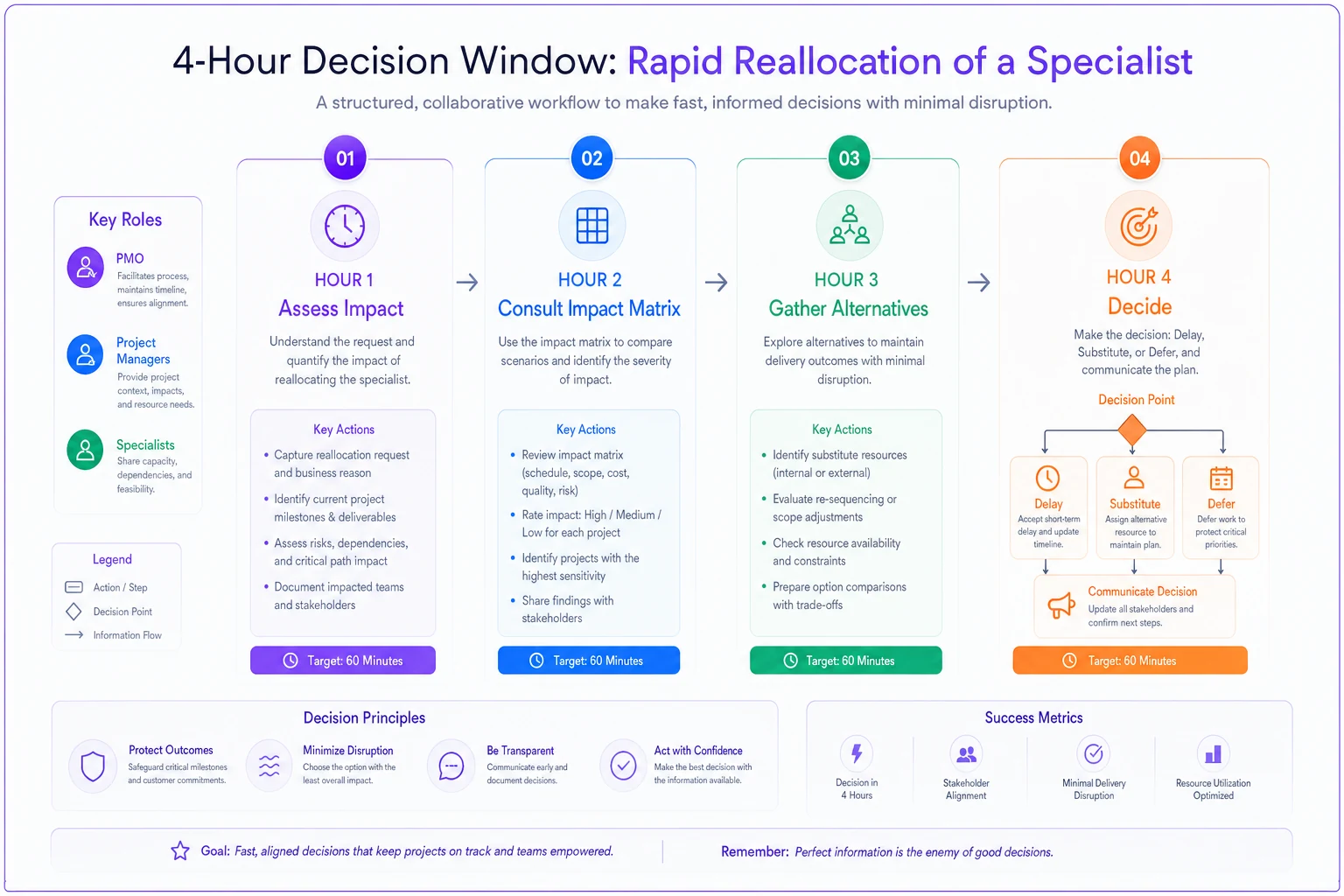
The 4-hour decision window
-
Hour 1
Confirm the constraint duration and impact. Is the specialist out for two days or two weeks? Which projects are affected today versus next week?
-
Hour 2
Pull the pre-built impact matrix showing what happens if each project loses this specialist. Good PMOs maintain these for their top 10 specialists.
-
Hour 3
Get alternatives from affected projects. Can they proceed with partial information? Switch to other workstreams? Use a less-ideal substitute resource?
-
Hour 4
Decide and communicate. Three options only: delay, substitute, or defer. No "we'll figure it out as we go."
A quick workflow diagram for the 4-hour decision window:
Substitution patterns that work (and those that don't)
-
Documentation handoff
Specialist documents decision criteria, another resource executes. Works for review and approval tasks, fails for creative design work.
-
Pair shadowing
Junior resource who's been shadowing the specialist takes over with remote supervision. Requires prior investment in shadowing, but enables 60-70% effectiveness.
-
Time-boxed consultation
Instead of full substitution, specialist provides 30-minute daily guidance while another resource does the work. Stretches specialist capacity by 3-4x for certain work types.
-
External augmentation
Bring in a consultant who knows the domain but not your environment. Specialist spends 2 hours briefing them, consultant handles next 2-3 days. Works for standard patterns, fails for highly customized systems.
What doesn't work: throwing a random senior resource at specialist work and hoping they'll figure it out. They won't, and they'll create rework that consumes more specialist time later.
The escalation tripwire
-
Any specialist unavailability exceeding 5 days
-
Multiple critical path projects affected simultaneously
-
No viable substitution option available
-
Reallocation cost exceeds $50k in project delays
When these tripwires hit, escalation isn't a discussion—it's automatic. The steering committee gets a one-page decision memo with three options, impact analysis, and PMO recommendation. Decision required within 24 hours.
Just having these tripwires reduces actual escalations by about 60%. Project managers stop treating every specialist constraint as a crisis when they know real crises have defined thresholds.
Building your specialist management operating system
The best PMOs don't just react to specialist constraints—they build systematic capability to predict and prevent them. This isn't about better resource planning. It's about creating an operating system that treats specialist management as a core discipline.
Start with specialist profiles that go beyond skills matrices. Document their unique knowledge areas, the systems only they understand, the relationships only they have. One financial services PMO discovered their "data architect" was actually the only person who understood the handshake between their trading system and settlement platform—knowledge that wasn't documented anywhere.
Create succession plans for critical specialists, but be realistic. You're not creating perfect replacements. You're creating enough backup capability to survive temporary unavailability. The goal is 60% effectiveness, not 100% replacement.
Track specialist utilization patterns over time. You'll find cycles—the compliance specialist is slammed every quarter-end, the security architect is overwhelmed after each acquisition, the data specialist peaks during migration windows. Plan portfolios around these patterns instead of pretending they don't exist.
Build knowledge preservation into project work. Every time a specialist completes critical work, they should produce documentation, decision logs, or pattern libraries that reduce future dependency. One PMO requires specialists to record 5-minute explanation videos for complex decisions. These videos saved hundreds of hours when similar questions arose later.
Monitor specialist burnout indicators before they become problems. Increasing response times to requests, declining participation in optional meetings, quality issues in typically excellent work—these are early warnings. When you see them, immediately reduce allocation, regardless of project pressure. A burned-out specialist is worse than an unavailable one because they make mistakes that create negative value.
The tools and automation reality
Most PMOs try to solve specialist bottlenecks with better resource management tools. They implement sophisticated capacity planning systems, build heat maps of resource utilization, create beautiful dashboards showing specialist allocation across projects. These tools help with visibility but miss the core issue: specialist bottleneck management is about decision velocity and tradeoff clarity, not planning precision.
Where operational software actually helps is in the mundane but critical tasks that enable specialist bottleneck management. Automatically capturing all specialist requests across channels—email, Slack, project tools—into a single demand view. Tracking time-to-response and time-to-completion for different request types. Identifying patterns in unplanned work that consistently disrupts specialist availability.
The valuable automation isn't in optimizing specialist schedules—it's in eliminating the administrative overhead that prevents good specialist management. When project managers can submit specialist requests through a simple form instead of scheduling meetings, when specialists can quickly indicate their availability windows without updating multiple systems, when the PMO can instantly see the impact of reallocation decisions across all affected projects—that's when specialist bottleneck management becomes sustainable.
AI automation particularly helps with pattern recognition across specialist utilization. Which types of projects consistently underestimate specialist needs? Which specialists are effective at knowledge transfer versus those who need support? What request patterns predict upcoming bottlenecks? These insights emerge from analyzing thousands of specialist interactions across projects, something humans can't do manually but AI handles easily.
The key is using automation to enhance decision-making, not replace it. The PMO still decides how to allocate scarce specialist time. But they make those decisions with complete information, clear tradeoffs, and minimal administrative friction.
Making specialist bottleneck management sustainable
Specialist bottlenecks won't disappear. As organizations pursue more complex transformations, depend on more specialized technology, and operate under more stringent regulations, specialist dependencies will only increase. The PMOs that thrive will be those that treat specialist management as a core strategic capability, not an operational annoyance.
The playbook components—demand capture, priority algorithms, buffer rules, and rapid reallocation—work best when implemented together. You can't effectively prioritize if you don't capture real demand. Buffer rules mean nothing without the discipline to enforce them. Rapid reallocation fails without pre-built substitution patterns.
Start small. Pick your three most constrained specialists. Implement demand capture for just them. Build priority weightings for their time only. Create buffer rules for their allocation. Develop a reallocation playbook for when they're unavailable. Run this for two months, learn what works, then expand.
The goal isn't perfect specialist utilization—it's predictable portfolio delivery despite specialist constraints. When project managers know specialist availability in advance, when specialists aren't constantly firefighting, when the PMO can confidently commit to deliveries knowing specialist bottlenecks are managed—that's when the portfolio operates at its full potential.
Specialist bottleneck management isn't about having more specialists or better planning. It's about building an operating system that acknowledges specialists as scarce resources requiring different management approaches than fungible resources. Organizations that understand this distinction and build appropriate management systems will deliver more consistently, with less drama, and ultimately with better outcomes than those still trying to force specialist resources into generic resource management frameworks.
Ready to elevate your project delivery?
Join over 2,500 project teams using GoProjy to optimize resources, reduce risks, and drive portfolio success.