


Most contractor shortfalls aren't surprises. They're visible 8 to 10 weeks out and nobody pulls the trigger in time. A workstream flags a staffing gap, everyone agrees "we'll need a senior integration engineer by Q3," and then it just... sits there. Until the gap is three weeks out and the PM is calling vendors at 9pm asking who can start Monday. By then the rate is 20% higher and the available candidates are the ones who've been passed on everywhere else.
The fix isn't "forecast better" in some abstract sense. It's building three specific artifacts that turn fuzzy demand into dated decisions: role-level lead-time tables, bench-sizing tradeoff math, and trigger-based hiring thresholds tied to a ramp checklist. This post covers all three with numbers you can actually use.
Why contractor gaps keep catching PMOs flat-footed
The core problem is that demand signals and procurement timelines run on completely different clocks.
Demand lives in the project plan, which thinks in deliverables and sprints. Procurement lives in a vendor's world — notice periods, interview rounds, background checks, security clearance, laptop provisioning. A PM looks at a Gantt and sees "resource needed week 14." Procurement sees "a senior role like this takes 7 weeks door-to-productive, so you needed to start recruiting in week 7." Nobody reconciles those two numbers until it's already late.
What makes it worse is that lead time isn't uniform across roles, and most PMOs treat it like it is. A junior QA tester and a cleared security architect are not remotely comparable. One you can backfill in under two weeks. The other can take two to three months when clearance is involved. When your planning assumption is some flat "contractors take about a month," you're going to be consistently wrong on exactly the roles that hurt most.
There's a related pattern worth naming: the quiet "we'll just extend them" assumption. Teams carry a contractor whose engagement ends in six weeks, treat renewal as automatic, and find out the person already accepted another gig. That's a lead-time failure dressed up as a renewal failure.
Role-level lead-time tables: the artifact everyone skips
The single highest-leverage thing you can build is a lead-time table by role profile. Not an average — a table. Below is a realistic version based on common contractor profiles. Adjust the ranges to your vendor mix and geography.
Stop losing track of critical projects.
GoProjy helps you monitor, prioritize, and deliver projects on time—seamlessly.
- Unified portfolio visibility
- Real-time resource tracking
- Milestone & risk alerts
No credit card required
| Role profile | Sourcing lead time | Vetting + legal | Onboarding to productive | Total door-to-productive |
|---|---|---|---|---|
| Junior QA / test analyst | 1–2 weeks | 3–5 days | 1 week | ~2.5–4 weeks |
| Mid-level developer | 2–3 weeks | 1 week | 1.5 weeks | ~4.5–6 weeks |
| Senior integration / platform engineer | 3–5 weeks | 1–1.5 weeks | 2 weeks | ~6–8.5 weeks |
| Business analyst (domain-specific) | 2–4 weeks | 1 week | 2–3 weeks | ~5–8 weeks |
| Cleared security architect | 4–6 weeks | 3–6 weeks (clearance) | 2 weeks | ~9–14 weeks |
| Specialist data engineer (niche stack) | 4–7 weeks | 1 week | 2–3 weeks | ~7–11 weeks |
| Change / adoption lead | 2–3 weeks | 1 week | 2 weeks | ~5–6 weeks |
Treat this as a living document and revise it quarterly based on what actually happened.
"Onboarding to productive" is almost never one week, and that's where the optimism hides. A senior engineer walking into a project with a tangled legacy codebase isn't contributing meaningfully on day three. They're reading docs, waiting on access IT forgot to provision, and figuring out who actually makes decisions. Count the real ramp, not HR's definition of "started."
The vetting-plus-legal column is where niche or regulated roles blow up. Clearance timelines are largely outside your control. If a role needs clearance and you're treating it as a 6-week hire, you've already lost before you started.
These numbers also drift. The lead time for a niche data engineer in a tight market this quarter is not what it was a year ago. Treat this as a living document and revise it quarterly based on what actually happened. The gap between your assumed lead time and your actual last-few-hires average is one of the most useful signals a PMO can track.
Bench-sizing: the tradeoff nobody wants to put numbers on
A bench — contractors kept engaged ahead of confirmed demand — buys you speed. It also costs money while people sit partially idle. Most PMOs make this call on gut feel, usually swinging between "never bench anyone" (constant delays) and "keep everyone around just in case" (margin bleed).
Here's the math that makes it concrete. A senior integration engineer billing at roughly $140/hour, benched at 50% availability between assignments, runs somewhere around $11k–$12k per month in carried cost.
Flip side: when that role isn't benched and a gap opens, you're looking at 6–8 weeks to source and ramp a replacement. If they're on a critical path, every week of delay carries real cost — extended project overhead, slipped go-lives, downstream teams sitting idle.
The real question isn't whether to have a bench. It's: for which specific roles does the carried bench cost come out cheaper than the expected delay cost, weighted by how likely you are to actually need them?
A rough decision rule that holds up in practice:
-
Bench the role when (a) lead time exceeds 6 weeks, (b) the role sits on or near a critical path across multiple projects, and (c) you have reasonable confidence demand materializes within the next quarter.
-
Don't bench when lead time is short (under 4 weeks), the role is easily substitutable, or demand is genuinely speculative.
The roles worth benching are almost always the long-lead, critical-path, scarce-skill ones — the same roles that come up in any serious conversation about preventing portfolio bottlenecks through capacity and demand management. Benching a junior tester to save two weeks rarely makes sense. Benching a cleared architect to save ten weeks often does.
When a bench is a bad idea
Be honest about the failure modes. A bench stops making sense when:
-
Your demand pipeline is genuinely unpredictable quarter to quarter. Benching into fog just converts margin into waste.
-
The skill is generic enough that the market fills it fast. You're paying to avoid a problem that was never going to cost you much.
-
You can't keep benched people engaged. Bored contractors leave, and then you've paid the carried cost and still have the gap.
You can't keep benched people engaged. Bored contractors leave, and then you've paid the carried cost and still have the gap.
Trigger-based hiring thresholds: turning "someday" into a dated action
Lead-time tables tell you how long things take. Triggers tell you when to move. The whole point of a trigger is to pull the judgment call out of the panic moment and put it into a rule decided calmly in advance.
A trigger is just: when [measurable condition] crosses [threshold], then [specific hiring action] fires, owned by [named person].
-
Lead-time countdown trigger. When a confirmed demand date is closer than the role's door-to-productive lead time plus a two-week buffer, open the requisition immediately. For a senior engineer with an 8-week lead time, recruiting starts 10 weeks before the need date — no committee, no debate.
-
Renewal-window trigger. When any contractor's end date falls inside their role's lead time, a renew-or-replace decision is forced. This eliminates the "we assumed they'd just stay" failure.
-
Pipeline-confidence trigger. When probability-weighted demand for a role profile crosses roughly 70% likelihood within the next quarter, start sourcing — even without a signed project. You're buying optionality on long-lead roles.
-
Utilization-ceiling trigger. When an existing scarce specialist runs sustained ~85% utilization across projects, start recruiting a second one before they become a single point of failure.
Here's a simple workflow to visualize how triggers fire and who owns the action.
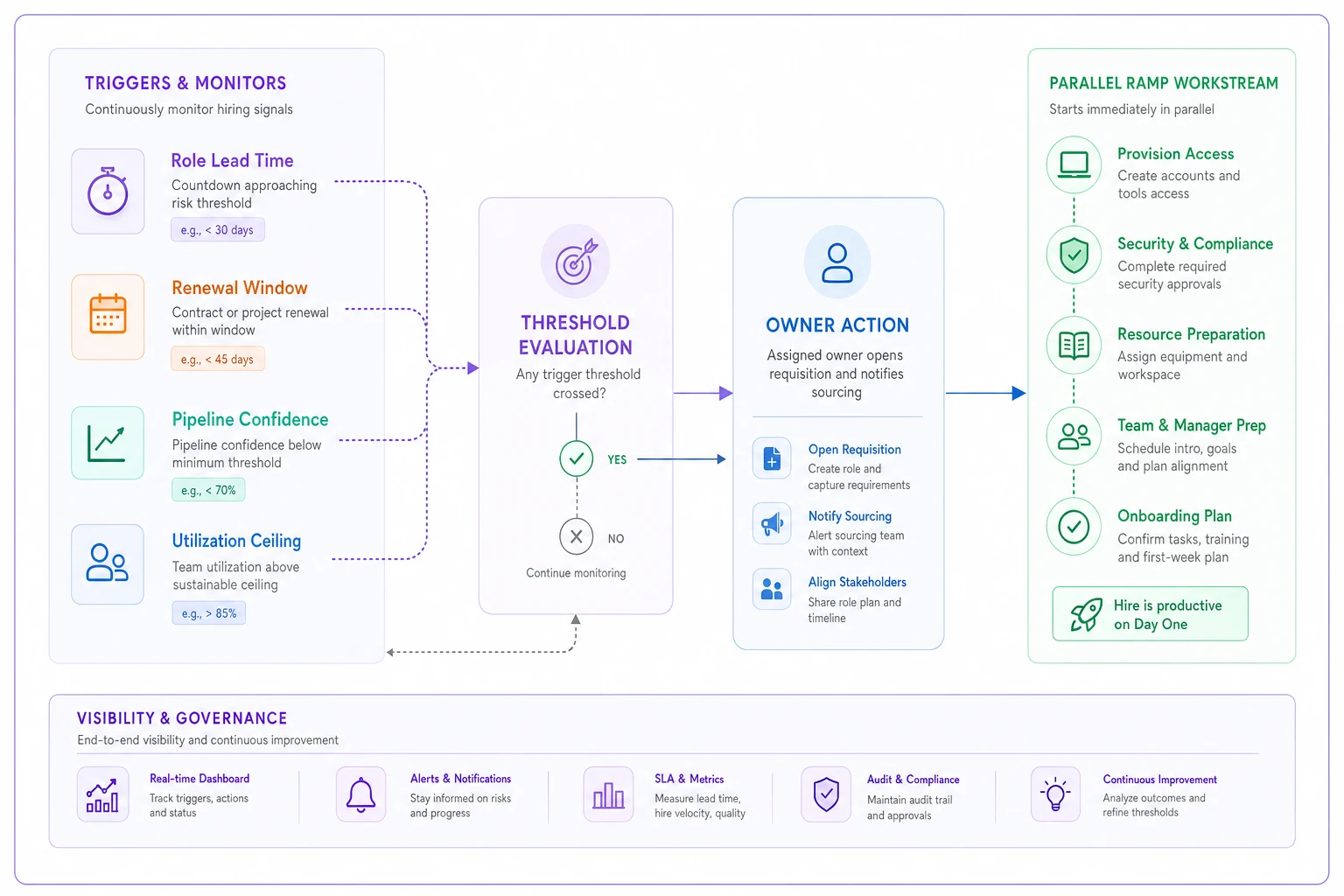
The discipline is that each trigger has an owner and a date, not a committee and a "let's revisit." Triggers fail most often not because they're badly designed but because nobody owns firing them — the condition crosses and everyone assumes someone else noticed.
The ramp-up checklist mapped to contractor profiles
Sourcing someone fast is only half the win. If they start and then wait two weeks for system access, you've thrown away your lead-time advantage. The ramp checklist protects the back end of the timeline.
Run this in parallel with sourcing — not after the contract is signed:
-
Access and provisioning — request accounts, VPN, repo access, and environment credentials the moment the offer is verbal. This is the single most common ramp killer.
-
Named buddy / point of contact — one specific person who answers "who do I ask about X" for the first two weeks.
-
Decision-map handoff — a one-pager on who actually approves what. Contractors waste days discovering the real approval chain.
-
Scope-and-acceptance clarity — what "done" looks like for their first deliverable, in writing, before day one.
-
Tooling and documentation pack — links to repos, architecture notes, the current sprint board. Not "ask around."
-
First-two-weeks milestone — a small, real deliverable due end of week two so you get an early read on fit.
For more complex profiles — senior engineers, architects, domain analysts — add a domain context session and a stakeholder intro round. For junior profiles, you can trim the decision-map and lean on the buddy.
The checklist matters because ramp time is the part of the lead-time table you actually control. You can't speed up a clearance. You can make sure the laptop and repo access are ready on day one instead of day eleven.
A real scenario: the integration engineer gap
A mid-sized PMO running a payments platform rebuild had a senior integration engineer rolling off in seven weeks. The resource plan showed the need continuing. Everyone assumed the engagement would extend.
It didn't. The contractor had lined up a longer gig elsewhere and gave notice. Because the real door-to-productive lead time was around 8 weeks and they started looking with 3 weeks left, the project hit a five-week gap on a workstream feeding two other teams. Extended overhead and schedule compression ran somewhere in the $45k–$60k range, plus a delayed milestone.
The following quarter they built the lead-time table and set a renewal-window trigger: any contractor whose end date fell inside their role's lead time forced a renew-or-replace decision automatically. On the next two long-lead roles, the trigger fired roughly 9 and 10 weeks out. Both resolved before becoming fire drills — one renewal, one clean replacement sourced with time to spare.
The difference wasn't better forecasting. The demand was visible both times. The difference was a dated trigger with an owner instead of a shared assumption that someone would handle it.
Who should not build this
Not every team needs the full apparatus. If your portfolio runs mostly short-lead, substitutable roles — generalist developers, junior analysts you can source in two weeks — building out a bench-cost model and quarterly lead-time table is probably over-engineering. You'll spend more maintaining the system than it saves.
This earns its keep when you have scarce, long-lead, critical-path contractor roles. The cleared specialists, the niche-stack engineers, the domain analysts who take months to replace. That's where a known gap turning into a scramble costs real money.
Pulling it together
Contractor shortfalls are rarely a forecasting failure. The need is almost always visible in the plan weeks ahead. What's missing is the machinery that converts a visible need into a dated, owned action before the window closes.
Three artifacts do that work. The lead-time table tells you how far ahead each role profile must start. The bench-cost tradeoff tells you which roles are worth carrying versus sourcing on demand. The triggers and ramp checklist make sure the decision fires on time and the person you source actually lands productive instead of waiting on a laptop. Build those three, keep the numbers honest by checking them against your last few actual hires, and the 11-week scramble mostly stops happening.
Build those three, keep the numbers honest by checking them against your last few actual hires, and the 11-week scramble mostly stops happening.
Ready to elevate your project delivery?
Join over 2,500 project teams using GoProjy to optimize resources, reduce risks, and drive portfolio success.