


If you run a PMO at a mid-sized org, you already know the demo trap. Every vendor shows you a gorgeous portfolio dashboard, some drag-and-drop Gantt magic, and a slick "executive view." Then six months into rollout you discover the roll-ups don't tie to your GL, dependencies live in three different tools, and finance still exports everything to Excel because the platform can't time-phase costs the way they need.
This shortlist skips the marketing. It maps six cloud SaaS portfolio management solutions against the three things a 250–1,000 person organization actually struggles with: centralized portfolio visibility, explicit cross-project dependency mapping, and finance-ready roll-ups. For the mechanics of how those roll-ups should be structured — cadence, data contracts, cost-to-complete logic — that's covered in depth over at make portfolio forecasts finance-ready. This piece assumes you've read that and are now asking a narrower question: which tool do I buy, and what will it actually cost me to run it?
Each vendor gets a one-page profile you can lift straight into a selection deck. At the end there's a requirement-to-vendor matrix, integration patterns, and three RFP questions worth copying.
Selection criteria: what actually separates these tools
Before the profiles, here's the filter worth applying. Not features — capabilities that map to real operational pain.
-
Native audit trail vs. bolt-on. For finance-ready anything, you need immutable change history on cost and schedule baselines. Some platforms record this natively down to the field level. Others log "something changed" and leave you reconstructing the story. This distinction alone eliminates half the market for regulated or heavily audited environments.
-
Time-phasing of cost. Can the tool spread a budget across periods and compare planned vs. actual vs. forecast by month? Or does it only hold totals? A surprising number of well-known tools only handle totals well and require a separate FP&A layer for phasing.
-
Explicit cross-project dependencies. Not task links inside one project — actual dependencies between projects in the portfolio, with visibility into what breaks when a predecessor slips. Very few do this cleanly.
-
Roll-up integrity. When someone edits a child project, does the portfolio number update predictably, or does it silently double-count shared resources and overlapping scope?
-
Integration depth with ERP/GL, Jira, and time systems. A read-only connector is not integration. You want bidirectional or at least reliable scheduled sync with clear conflict rules.
One thing buyers consistently underestimate: the internal people-cost to implement and run. The "FTE effort" figures below refer to that, not vendor professional services.
Vendor profiles
1. Planview (Portfolios / PPM Pro)
Stop losing track of critical projects.
GoProjy helps you monitor, prioritize, and deliver projects on time—seamlessly.
- Unified portfolio visibility
- Real-time resource tracking
- Milestone & risk alerts
No credit card required
| Attribute | Detail |
|---|---|
| Pricing model | Per-user, tiered by role (contributor vs. full PPM user); enterprise annual contracts |
| Typical range | Roughly $60k–$180k/yr depending on seat mix at this org size |
| Implementation time | 4–7 months for a real rollout with financials |
| Estimated FTE effort | ~1.0–1.5 FTE during implementation, ~0.5 ongoing admin |
| Representative use case | A 600-person org consolidating a dozen departmental PMOs into one governed portfolio with capacity planning |
| Required integrations | ERP (SAP/Oracle), Jira, timesheet system, SSO |
| Typical caveats | Powerful but heavy; underused if you don't have a dedicated admin. Financial modeling is strong but assumes you feed it clean actuals |
Planview handles time-phasing and audit trails natively, which is why it survives finance scrutiny. The trade-off is weight — this is not a tool a two-person PMO adopts casually. What tends to happen is orgs buy the full suite and end up using maybe 40% of it because nobody was actually assigned to own configuration.
2. Broadcom Clarity (formerly CA PPM)
| Attribute | Detail |
|---|---|
| Pricing model | Per-user, enterprise licensing |
| Typical range | Roughly $80k–$200k+/yr |
| Implementation time | 5–9 months |
| Estimated FTE effort | ~1.5–2.0 FTE during implementation |
| Representative use case | Finance-heavy portfolio with strict CapEx/OpEx tracking and chargeback across business units |
| Required integrations | ERP/GL, Jira, HR system for resource data |
| Typical caveats | Deep financial capabilities, steeper learning curve; the modern UX is better than its reputation but legacy configs linger |
Clarity is arguably the strongest on native financial roll-ups and audit trails in this list. It's built for the organization where finance is a first-class portfolio stakeholder, not an afterthought. The caveat is real though: implementations drag when nobody defines the cost model up front. Decide your time-phasing and chargeback rules before configuration starts, not during.
Define time-phasing and chargeback rules before configuration to avoid implementation delays.
3. Smartsheet (with Control Center / Resource Management)
| Attribute | Detail |
|---|---|
| Pricing model | Per-user tiers + add-on modules (Control Center, Resource Management priced separately) |
| Typical range | Roughly $30k–$90k/yr including key add-ons |
| Implementation time | 6–12 weeks for a structured portfolio setup |
| Estimated FTE effort | ~0.5–1.0 FTE, lighter ongoing |
| Representative use case | A PMO graduating off spreadsheets that needs governance without a heavy PPM commitment |
| Required integrations | Jira, DataMesh/premium connectors, ERP via connector or middleware |
| Typical caveats | Cross-project dependencies and true financial time-phasing require workarounds or an FP&A tool downstream |
Smartsheet is the pragmatic middle. Fast to stand up, familiar to spreadsheet-native teams, and genuinely good at centralized visibility once Control Center is configured. Where it strains is finance-grade roll-ups — you can build them, but you're constructing the logic yourself, and the audit trail is thinner than a purpose-built PPM. For many mid-market PMOs that's an acceptable trade-off for speed.
4. Adobe Workfront
| Attribute | Detail |
|---|---|
| Pricing model | Per-user, tiered by license type |
| Typical range | Roughly $50k–$140k/yr |
| Implementation time | 3–6 months |
| Estimated FTE effort | ~1.0 FTE during implementation |
| Representative use case | Operations- and marketing-heavy portfolios with high work-request volume and approval workflows |
| Required integrations | Jira, ERP (via connectors), time tracking, DAM |
| Typical caveats | Excellent work management and visibility; financial roll-ups and time-phasing usually need an external FP&A layer |
Workfront shines on operational throughput — intake, approvals, resource visibility across a busy portfolio. It's less of a financial engine. If your primary pain is "we can't see what everyone is working on," it's strong. If it's "finance won't accept our numbers," you'll be pairing it with something else for the cost side.
5. monday work management (Enterprise)
| Attribute | Detail |
|---|---|
| Pricing model | Per-seat tiers, Enterprise plan for governance/security |
| Typical range | Roughly $25k–$75k/yr |
| Implementation time | 4–10 weeks |
| Estimated FTE effort | ~0.5 FTE |
| Representative use case | Fast-moving org wanting quick centralized visibility and flexible dashboards without heavy PPM overhead |
| Required integrations | Jira, native connectors, ERP via API/middleware |
| Typical caveats | Flexible and fast, but dependency mapping across projects and finance-grade audit trails are weak spots at portfolio scale |
monday has the easiest adoption story here — teams take to it quickly and dashboards look reasonable with little effort. The honest limitation: it was built for work management, and stretching it into governed financial portfolio roll-ups means building a lot of structure yourself and accepting a thinner audit trail. Great for visibility, questionable for finance-ready without additional adapters.
6. ServiceNow SPM (Strategic Portfolio Management)
| Attribute | Detail |
|---|---|
| Pricing model | Subscription, typically bundled with existing ServiceNow footprint |
| Typical range | Highly variable — often $100k–$250k+/yr, cheaper incremental if you already run ServiceNow |
| Implementation time | 5–9 months |
| Estimated FTE effort | ~1.5–2.0 FTE, plus platform admin |
| Representative use case | IT-heavy org already on ServiceNow wanting portfolio, demand, and financials on one platform |
| Required integrations | Native to ServiceNow ecosystem; ERP/GL via IntegrationHub, Jira via connector |
| Typical caveats | Compelling if you're already invested in ServiceNow; overkill and expensive if you're not |
SPM's audit trail and workflow governance are genuinely strong because they inherit the ServiceNow platform's controls. Time-phasing is capable. The whole calculus changes based on one question: are you already a ServiceNow shop? If yes, it's often the best-value option on this list. If no, the platform cost swamps the PPM value.
Requirement-to-vendor matrix
The honest scorecard. "Native" means it works out of the box; "Adapter" means you need a connector, custom config, or an FP&A tool alongside it.
| Requirement | Planview | Clarity | Smartsheet | Workfront | monday | ServiceNow SPM |
|---|---|---|---|---|---|---|
| Centralized visibility | Native | Native | Native | Native | Native | Native |
| Cross-project dependencies | Native | Native | Adapter | Partial | Adapter | Native |
| Finance-ready roll-ups | Native | Native | Adapter | Adapter | Adapter | Native |
| Time-phasing of cost | Native | Native | Adapter | Adapter | Adapter | Native |
| Native audit trail | Native | Native | Partial | Partial | Partial | Native |
| Fast implementation | No | No | Yes | Partial | Yes | No |
| Low FTE to run | No | No | Yes | Partial | Yes | No |
The pattern isn't subtle: the tools that satisfy finance natively cost more and take longer to stand up. The tools that stand up fast leave you assembling the finance layer yourself. There's no free option that does both — anyone telling you otherwise hasn't tried to close a quarter on their platform.
When each choice actually makes sense
Choose a heavy PPM (Planview, Clarity, ServiceNow SPM) when: finance is a formal portfolio stakeholder, you have audit or compliance obligations, and you can assign at least one dedicated admin. If nobody owns the tool, don't buy the heavy one — you'll pay for a Ferrari and drive it in first gear.
Choose a lighter platform (Smartsheet, monday, Workfront) when: your first battle is visibility and coordination, your finance roll-up can live in a downstream FP&A tool, and speed-to-value matters more than depth. This is the right call more often than PMO leaders admit — a lot of orgs need coordination fixed before they need portfolio-grade financials.
Who should NOT buy any of these yet: if your project data is inconsistent across teams and you have no agreed data contract, no tool will save you. The roll-up will inherit your mess. Fix the data model first — a platform amplifies whatever discipline (or lack of it) you feed it.
Recommended integration patterns
Regardless of vendor, the connection topology tends to look the same at this org size:
-
ERP/GL as the financial source of truth. Actuals flow from the ERP into the portfolio tool, never the reverse. The PPM holds plan and forecast; the GL holds actuals. Keep that boundary clean and reconciliation stops being a fight.
-
Jira (or Azure DevOps) as the delivery source. Status, progress, and completion flow up from delivery tools. Don't re-key status into the portfolio layer — sync it.
-
Time system feeding effort actuals. Timesheet data drives resource cost and utilization. This is the integration people skip and then wonder why utilization numbers look like fiction.
-
A reconciliation cadence, not real-time everything. Scheduled sync with clear conflict rules beats brittle real-time pipes. Define which system wins on conflict before go-live.
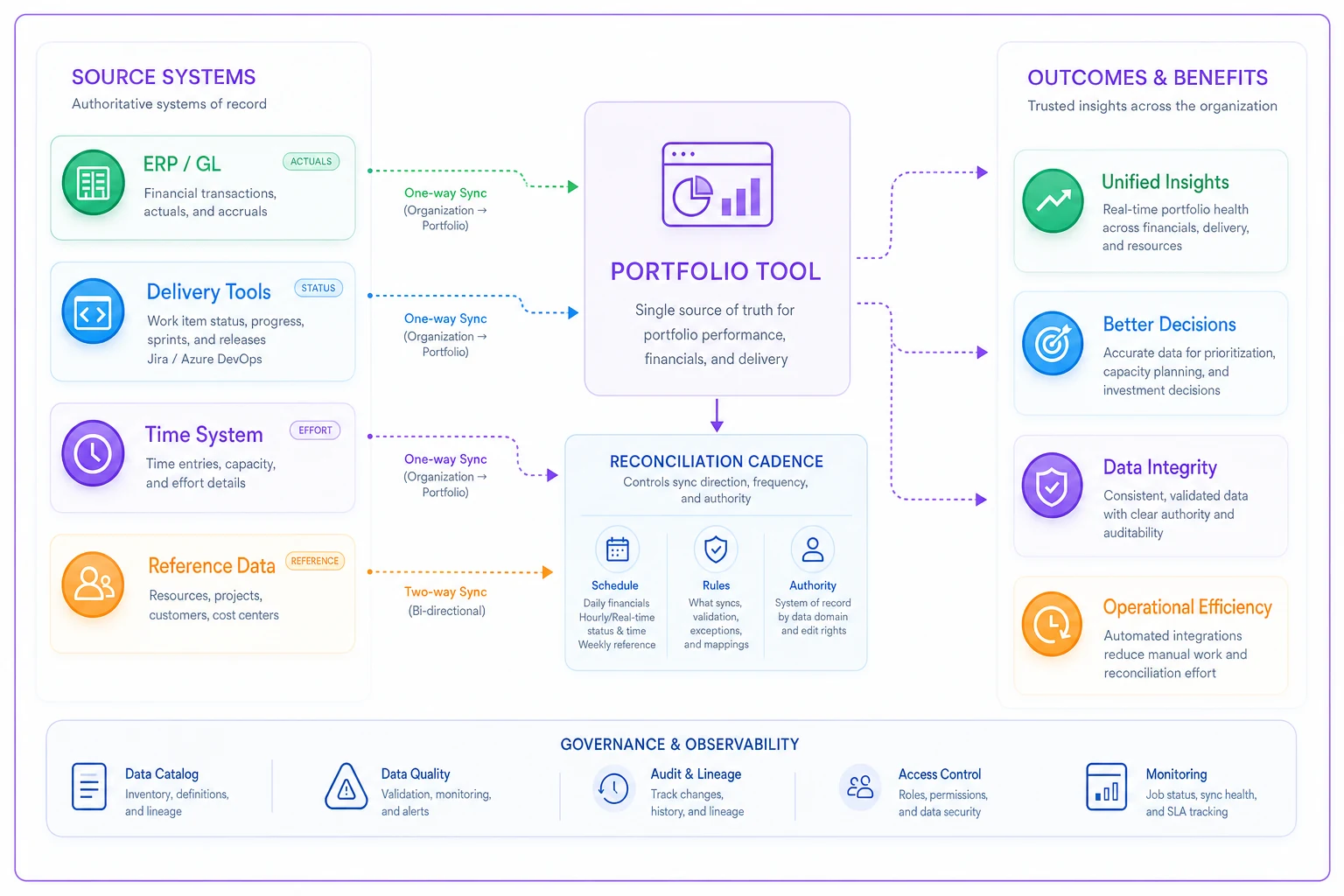
The failure mode here is treating every connector as bidirectional. Decide direction and authority per data type. Actuals: ERP wins. Status: delivery tool wins. Forecast: PPM wins. Write it down.
Three RFP questions worth copy-pasting
Skip the generic vendor questionnaire.
These three surface the answers that actually matter for finance-ready portfolios:
-
"Show me the field-level audit trail on a cost baseline change — who changed it, when, from what value to what, and can that history be exported for an auditor?" If they demo a general activity feed instead of field-level history, that's your answer.
-
"Time-phase a project budget across 12 months, post partial actuals against three of those months, and show planned vs. actual vs. forecast by period in a portfolio roll-up — without exporting to Excel." Watch whether they can do it live or need to "follow up."
-
"When Project A slips its finish date, show me every downstream project in the portfolio affected by that dependency and the net schedule impact — automatically." This separates real cross-project dependency mapping from single-project task links dressed up in a demo.
Use these questions in the demo and insist on live answers rather than "we'll follow up".
The mistake that comes up most in tool selection isn't picking the wrong vendor — it's picking a great vendor for a problem you don't actually have first. A finance-heavy org buying monday for its speed, then spending a year bolting on financial structure. A coordination-starved team buying Clarity, then abandoning most of it because there's no admin to run it.
Match the tool to your primary constraint, be honest about the FTE cost to operate it, and pressure-test the finance capabilities with the three RFP questions above rather than the polished demo path. Pair that with a clean data contract and a reconciliation cadence, and any of these six can carry a mid-sized portfolio. Skip the data discipline, and none of them will.
Ready to elevate your project delivery?
Join over 2,500 project teams using GoProjy to optimize resources, reduce risks, and drive portfolio success.